
Bellingham Central Library will be closed for renovations starting January 1, 2027.
Patrons who pick up their holds at Bellingham Central Library need to change their holds pick-up location by December 27, 2026 to another library location. If you do not choose a new location by that time, your holds pick-up location automatically will default to the Bellis Fair Branch. The processes for changing the pick-up location for items you have already placed holds on (but which are not yet available), as well as pick-up locations for your future requests are outlined here.
Change Existing Holds Location
For holds you placed previously, but you have not yet received, you can change the pick-up location in one of three ways.
Options:
- Go to a Bellingham Public Library (BPL) or Whatcom County Library System (WCLS) branch and ask for assistance at the help desk,
- Call BPL 360-778-7323 or WCLS 360-305-3600,
- Change the location yourself online using the shared Polaris catalog for BPL-WCLS. (Note that this is different from your account dashboard available on our website.)
- Visit bpl-wcls.polarislibrary.com
- Log in using your library barcode and pin number (if you are unsure of your barcode or pin, call or visit a BPL or WCLS branch)

- Click on “Requests” under “My Account”

- Choose the items whose locations you want to change
- Click on “Change Pickup Location”

- Select a “New Pickup Location” from the drop-down menu

- Click “Submit”

Change Future Holds Location:
When you place a hold online, you may get a pop-up prompting you to choose the location where you want to pick up that item. “Bellingham” means the Central Library. To choose a different branch, simply select a location other than “Bellingham” the next time you place a hold.
If you have enabled “Single-Click Holds” in your account, your hold location will default to your “Preferred Pickup Location”. You will need to change your “Preferred Pickup Location” in your account. Library staff are not able to do this for you.
- Go to the BPL homepage bellinghampubliclibrary.org
- Under the “I want to” menu, click on “Log in to my account”
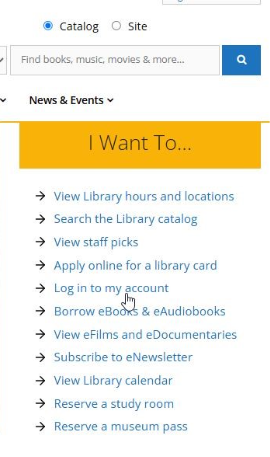
- Log in using your library barcode or username and your pin number (if you are unsure of your barcode or pin, call or visit a BPL or WCLS branch)
- Under the “My Borrowing” menu find and click “On Hold”
- At the bottom of the menu, click on “Single-Click Holds is ON”

- Select a new “Preferred Pickup Location” from the drop-down menu

- Click “Save”.
